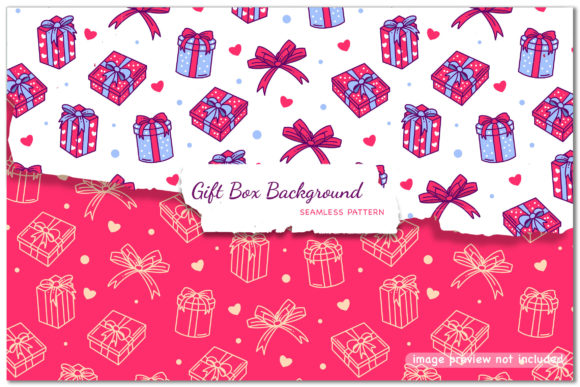
Gift Box Background - Seamless Patterns
If you’ve ever spent hours layering, tiling, or manually editing a background to make it look like a cohesive gift box texture—only to end up with visible seams, mismatched colors, or blurry edges—you’re not alone. Gift Box Background - Seamless Patterns solves that exact problem: it’s a set of professionally designed, truly repeatable patterns built from realistic gift wrap textures—think matte kraft paper, glossy foil accents, subtle twine weaves, and soft linen finishes—all optimized so they tile flawlessly in any direction.
Why This Isn’t Just Another “Wrap” Graphic
Many people assume any festive-looking JPEG or PNG labeled “gift box background” will work for print invites, e-commerce banners, or social media posts. But most free or low-cost options aren’t actually seamless—they’re cropped images masquerading as patterns. When stretched or tiled, they expose hard edges, inconsistent lighting, or repeating flaws that distract rather than delight. What makes Gift Box Background - Seamless Patterns different is intentionality: each pattern was constructed in vector (EPS and AI CC versions) first, then exported to high-res raster formats (JPEG and PNG) with transparency support—so you get flexibility *and* fidelity.
A Common Mistake: Assuming File Format = Usability
It’s easy to see “EPS, AI, JPEG, PNG included” and assume you’re fully covered. But format alone doesn’t guarantee compatibility—or quality. For example:
- Using the PNG at 300 DPI for large-format print often leads to pixelation, because PNGs are resolution-dependent. The EPS or AI version? Scalable to any size without loss.
- Opening the AI file in an older version of Illustrator (pre-CC) may cause fonts or effects to break—even if the file says “AI CC Version.” Always check your software version against the file’s export settings.
- Assuming the JPEG has a transparent background—it doesn’t. Only the PNG does. If you drop a white-background JPEG over a colored layout, you’ll get an unintended halo effect.
These oversights don’t just cost time—they undermine professionalism. A wedding planner using a non-transparent JPEG on a blush-pink invitation might need to rework the entire layout. A small business owner printing holiday packaging with a pixelated JPEG could receive customer comments about “low-quality design.”
What to Check Before You Download or Buy
Before adding Gift Box Background - Seamless Patterns to your project, ask yourself three practical questions:
- What’s my primary use case? If it’s web banners or email headers, the high-res PNG or JPEG works fine. If it’s signage, packaging mockups, or scalable branding assets, prioritize the EPS or AI file—and confirm your design tool supports it.
- Do I need transparency? Yes? Then verify the PNG includes alpha channel support (most do—but always preview in your editor before finalizing). No? Then the JPEG may be smaller and faster to load.
- How much control do I need over color or texture? Vector files let you recolor elements, adjust stroke weights, or isolate layers. Raster files lock you into what’s baked in. If you plan to tweak gold foil intensity or mute a red pattern for accessibility, start with AI or EPS.
Misunderstanding “Seamless” — And How It Impacts Real Work
“Seamless” sounds straightforward—until you try tiling a pattern across a 48" wide banner and notice a faint line every 12 inches. True seamlessness isn’t just about hiding the edge; it’s about balancing scale, contrast, and rhythm so repetition feels intentional—not mechanical. Some creators overlook this and choose patterns with overly tight repeats (e.g., tiny polka dots spaced at 0.25") which can vibrate or blur on screen. Others pick ultra-busy designs (like dense herringbone + glitter overlay) that overwhelm text or product photography.
A better approach? Test at actual size. Import the pattern into your layout at 100% zoom and scroll slowly across the canvas. Look for:
- No visible “jump” where tiles meet
- Consistent light direction and shadow depth
- Texture density that supports—not competes with—your foreground content
For example, a blogger designing a holiday gift guide might pair a soft kraft-paper seamless pattern (subtle, warm, low-contrast) with bold sans-serif headlines. That creates hierarchy. Using a high-gloss metallic pattern instead could visually compete with product photos and reduce readability.
Getting More Out of Your Purchase—Without Extra Tools
You don’t need advanced skills to use Gift Box Background - Seamless Patterns well. In fact, many beginners overcomplicate things by trying to “customize too much”—adjusting opacity, adding filters, or layering multiple patterns. Often, the cleanest result comes from using one pattern at full strength, aligned to your document’s grid, and letting its craftsmanship speak for itself.
Here’s what works reliably across platforms:
- In Canva: Upload the PNG, set it as a background, and use Canva’s “Position” slider to nudge alignment—small adjustments here prevent accidental mis-tiles.
- In Photoshop: Use Edit > Define Pattern with the JPEG or PNG, then apply via Layer Style > Pattern Overlay. This gives non-destructive control over scale and blending mode.
- In Illustrator: Drag the AI file onto your artboard, then drag it into the Swatches panel. Now it’s a true swatch—you can apply it to any shape, resize freely, and edit globally.
One Final Practical Note: Licensing & Longevity
Most users don’t think about licensing until they’re preparing a client deliverable—or uploading to a platform that auto-scans for copyrighted assets. The Gift Box Background - Seamless Patterns package typically includes standard commercial use rights (check your specific license), meaning you can use it in client projects, digital products, or physical goods—no extra fees. But it does *not* include resale rights for the pattern files themselves. So if you’re building a template shop or offering editable Canva templates, you’ll want to confirm whether your license permits redistribution (some do; some require an extended license).
Also worth noting: vector files age better. That EPS or AI version you download today will still open cleanly in Illustrator 2030—if saved properly. JPEGs and PNGs? They’ll remain usable, but won’t adapt to future resolution demands the way vectors do. Think of the vector as your long-term asset, and the rasters as your ready-to-deploy tools.
Ultimately, Gift Box Background - Seamless Patterns isn’t about making things “look festive.” It’s about giving your work visual consistency, technical reliability, and quiet confidence—so your message, product, or story stays front and center. Choose intentionally, test realistically, and let the pattern do the thoughtful work it was designed to do.