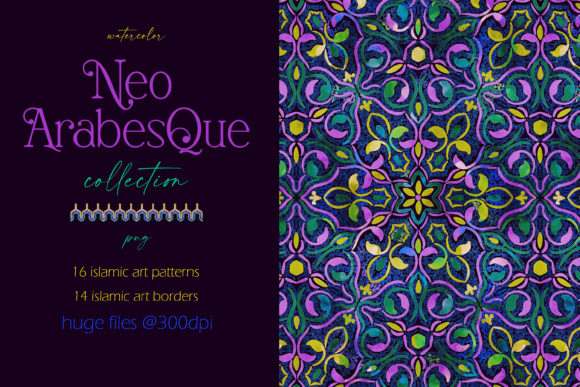
Neo Arabesque Patterns and Borders
Neo Arabesque Patterns and Borders is a curated digital asset collection rooted in Islamic art traditions—but reimagined for contemporary design workflows. It brings together 16 seamless watercolor patterns and 14 seamless borders, all rendered at print-ready 300 dpi resolution and delivered as PNG files with transparent backgrounds. Unlike static clipart or low-resolution repeats, these assets are built for scalability, adaptability, and visual cohesion across physical and digital outputs.
Where Neo Arabesque Fits in Your Creative Process
This collection doesn’t replace your design software—it enhances it. Whether you’re preparing a brand identity system, developing packaging mockups, or laying out wedding stationery, Neo Arabesque Patterns and Borders enters your workflow where intention meets execution: after concept development but before final export. It’s most effective when used during the refinement stage—when typography, color palettes, and layout structure are already defined, and you’re adding layered visual texture that carries cultural resonance without feeling derivative.
For example, a textile designer sketching a new scarf line might use one of the larger-scale patterns to test repeat alignment on fabric swatches. A branding freelancer building a boutique hotel’s visual identity could layer a subtle border around invitation suites or apply a muted pattern as a watermark behind service icons. In both cases, the asset isn’t the starting point—it’s a precision tool applied deliberately to reinforce tone, heritage, and craft.
Compatibility and Integration Across Tools
All files are PNGs with alpha channels, meaning they drop cleanly into Adobe Photoshop, Illustrator, Affinity Designer, Figma, Canva, and even PowerPoint—no clipping masks or background removal needed. Because each file is saved at full scale (not tiled), you retain flexibility: scale down for delicate stationery motifs or enlarge for wall murals without pixelation. This eliminates the common friction of sourcing high-res repeats that either tile poorly or lack resolution headroom.
When paired with vector-based layouts, Neo Arabesque Patterns and Borders works best as a raster overlay—applied above vector shapes but beneath text layers. That preserves editability while allowing soft watercolor grain to interact naturally with sharp edges. For print production, confirm that your RIP (raster image processor) supports transparency flattening, especially if exporting to PDF/X-1a for commercial printers. Most modern workflows handle this automatically, but verifying early avoids last-minute surprises.
Practical Use Cases by Workflow Stage
- Before a project: Use the preview images—not just as thumbnails, but as reference guides for scale. Note which patterns measure 3600×3600 px versus 6000×6000 px. This helps you match asset size to intended output: smaller repeats suit business cards and social media banners; larger ones anchor wallpaper designs or fabric yardage.
- During production: Apply borders along document margins or frame elements in editorial layouts. Since each border is seamless and transparent, you can rotate, flip, or offset them to create custom frames—no need to stitch corners manually. Try using blending modes like Multiply or Overlay in Photoshop to let underlying colors influence the watercolor tones subtly.
- After delivery: Reuse assets across client projects with confidence. Because the palette is modern—not historically literal—you avoid repetition fatigue. A deep indigo pattern used for a tech startup’s report cover reads differently when layered over warm peach paper stock for a bakery’s thank-you card. The same file, different context, distinct outcome.
Organizing and Managing the Collection
Unzip the folder once and sort files immediately: create two top-level folders—“Patterns” and “Borders”—then subdivide by dominant hue (e.g., “Terracotta,” “Sage,” “Midnight”). Naming matters: rename files to include scale and orientation, such as neo-arabesque-pattern-terracotta-6000x6000.png. This pays off when searching across cloud drives or asset libraries later.
If you use Adobe Bridge or a DAM (digital asset management) tool, embed metadata: add keywords like “Islamic art,” “watercolor repeat,” “transparent background,” and “300 dpi.” That surfaces Neo Arabesque Patterns and Borders in relevant searches alongside other assets—even years later—without manual recall.
Quality Control and Consistency
Because these are hand-painted watercolor interpretations—not algorithm-generated repeats—subtle variations exist between files: some show granular pigment bleed, others emphasize soft washes. That’s intentional. To maintain consistency across a multi-piece project (like a wedding suite), pick one pattern and one border as anchors, then limit variation to opacity, blending mode, or placement—not base motif.
Test prints early. Watercolor textures often read lighter on screen than on uncoated paper. If using for packaging or letterpress, reduce overall opacity by 5–10% before sending to print. Likewise, for dark backgrounds, check contrast: some lighter patterns may need a subtle inner glow or 1-pt stroke to remain legible.
Long-Term Usability and Adaptability
This collection gains value over time—not because it’s trendy, but because it bridges stylistic eras without leaning into cliché. You won’t outgrow Neo Arabesque Patterns and Borders by switching industries or updating software. Its strength lies in neutrality: the watercolor medium softens geometric rigidity, while the palette avoids seasonal saturation. A sage-and-cream pattern used for yoga studio branding today reads equally well for a ceramicist’s product labels next year.
For educators or workshop leaders, these files serve as accessible entry points into Islamic art history—without requiring deep subject-matter expertise. You can pair a pattern with a short note about symmetry in Arabic geometry or discuss how traditional girih tiles translate into fluid watercolor flow. No lecture required—just visual context that invites curiosity.
Real-World Implementation Tips
- For freelancers: Store Neo Arabesque assets in a shared cloud folder with clearly labeled usage rights. Clients appreciate knowing exactly what’s licensed—and that no third-party attribution is needed.
- For small business owners: Apply a single border to email headers, product tags, and invoice footers. Repetition builds recognition faster than changing motifs every campaign.
- For hobbyists: Print patterns on iron-on transfer paper for custom tote bags or tea towels. The transparency means no white edges—just clean, dye-sublimation–ready repeats.
- For marketers: Use patterns as subtle background layers in webinar slides or LinkedIn carousels. They add warmth without competing with data visuals—unlike busy stock textures.
Neo Arabesque Patterns and Borders doesn’t ask you to change your process. It asks you to notice where texture, rhythm, and quiet elegance are missing—and gives you tools calibrated for that gap. It’s not about adding more steps. It’s about making the steps you already take feel more intentional, more grounded, and more yours.